We’ve all seen this happen: a customer messages you on WhatsApp, genuinely interested in your product, you send them a link to a landing page… and that’s where you lose them. They switch apps, get distracted, close the tab. A conversation that was going great dies at the handoff.
Meta knows this, which is why it launched WhatsApp Flows: a feature that lets you build forms, surveys, appointment bookings, and even full purchase processes that run inside the chat, with no redirects anywhere.
If your business runs on WhatsApp Business API, this isn’t a “nice to have.” It’s arguably the update with the biggest conversion impact Meta has shipped in years.
What Exactly Are WhatsApp Flows?
A Flow is an interactive interface, think screens with text fields, buttons, dropdowns, checkboxes, date pickers, that opens directly on top of the WhatsApp conversation. The user fills it out right there, hits submit, and the data lands in your system (CRM, database, scheduling platform) without anyone ever leaving the app.
It’s not a button-based message. It’s not a link to a Typeform. It’s a native experience that Meta renders inside WhatsApp itself.
It’s triggered from a template message or a business reply, and it can include multiple chained screens with conditional logic: if the user answers “yes” on screen 1, they see screen 2A; if “no,” they see 2B.
Why This Matters to Your Business (Not Just Your Dev Team)
Because every step you ask a user to take outside the chat is a chance for them to leave. Flows remove that jump entirely. And that translates into very concrete numbers:
Everything happens on the channel your customer is already using. You’re not competing with notifications from other apps or asking them to install anything new.
Less friction = more completions. No page load, no logging into another site, no “wait, where did I save that link?”
Structured data from day one. Instead of parsing “hi I want pricing for 3 people on August 15th” by hand, you get a clean data object ready for your CRM.
Real Use Cases (The Ones Actually Worth Building)
1. Appointment Booking
Clinics, salons, professional services: instead of a back-and-forth of “are you free Thursday?”, the Flow shows a calendar, the user picks a day and time, and the appointment is confirmed instantly.
2. Lead Generation and Qualification
A “tell us about your project” form with multiple choice, conditional fields, and data validation — the same thing you’d put on your website, but with the completion rate of a WhatsApp chat, which tends to run noticeably higher than a cold web form.
3. Post-Purchase Surveys and NPS
Short questions with scales and options that customers answer in seconds because they’re already in the conversation with the brand — no need to open an email with a link to Google Forms.
4. Checkout and Payments (Where Meta Enables It)
In markets where WhatsApp Pay is available, Flows let you build a complete purchase flow: product selection, address, payment method, confirmation. Conversational commerce stops being a pitch line and becomes an actual end-to-end flow.
5. Account Data Updates
Renewals, address changes, updating a payment method: any process you currently handle with a human agent copying and pasting information can become a self-service Flow.
How Do You Implement a Flow?
This is where the technical side comes in, and where having an official Meta partner like Treble makes the difference between “I read this exists” and “I have it running next week”:
- Design the Flow in Meta’s Flow JSON (or through a visual builder, depending on the platform you use). Read the full step by step guide.
- Define the logic: which screens show, in what order, under what conditions.
- Connect it to your backend via an endpoint that receives and processes responses in real time.
- Publish and get Meta’s approval (published Flows go through review, just like message templates).
- Activate it from a template message that includes the button to open the Flow.
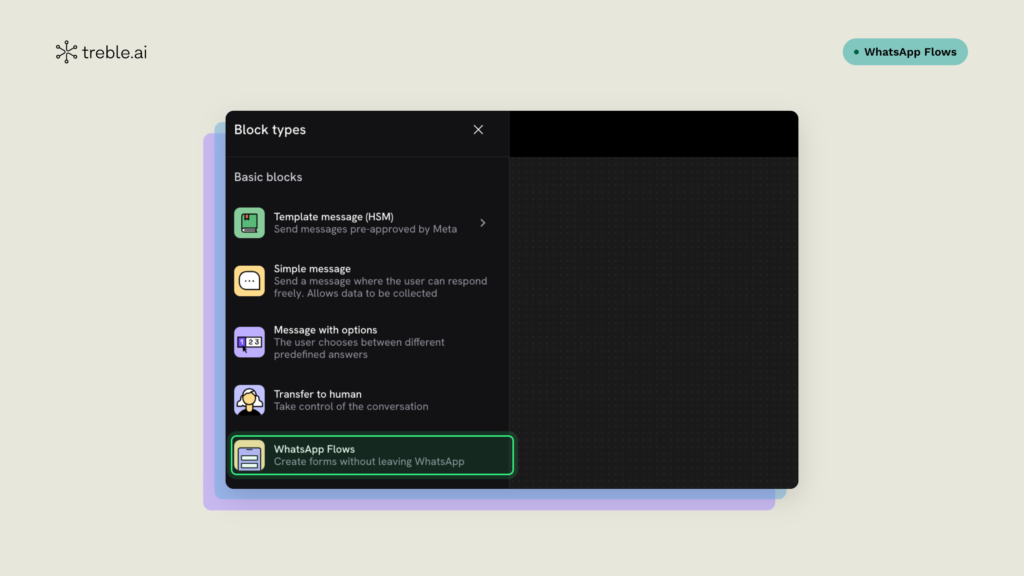
On Treble, this step is as simple as creating a conversation (automation) in the platform and choosing the “WhatsApp Flows” node, where you can select an existing Flow and drop it straight into the automation, no extra code required.
If your business already runs WhatsApp Business API through a BSP (Business Solution Provider), the provider typically gives you tools to build this without hand-writing JSON line by line.
At Treble, for example, WhatsApp Flows is a native platform feature: many of our clients already use it today to book appointments, qualify leads, and run surveys, and they can connect the responses directly to the tools they already use day-to-day, like HubSpot, Google Sheets, and other integrations, with no additional development needed.
Best Practices Before Launching Your First Flow
- Start simple. A 2-3 screen Flow to book an appointment converts better than an 8-screen one trying to capture every possible data point.
- Think mobile-first, always. 100% of this experience happens on a phone; long fields or endless lists kill completion rates.
- Test the conditional logic thoroughly. A Flow that sends a user to the wrong screen breaks trust faster than a poorly built web form.
- Measure drop-off by screen, not just total conversion. It’ll tell you exactly where you’re losing people.
The Bottom Line for Your Business
WhatsApp Flows aren’t just another item on the API’s feature list. They’re the difference between using WhatsApp as a messaging channel and using it as a full transactional channel: book, sell, survey, and collect payment, all without the customer ever opening another tab.
If your company already has WhatsApp Business API and is still sending links to external forms, you’re leaving conversion on the table.