On Black Friday, the business that sells the most on WhatsApp isn’t the one with the best deal, but the one with someone to send it to. Without a contact list, your campaigns have nowhere to go. And if you build it the wrong way, they can end in blocks right during the most important week of the year.
The good news is that there’s still time. In this article, we explain how to build your WhatsApp contact list before Black Friday, which opt-in rules you need to follow, and how to organize it to sell more.
Why Your Contact List Is the First Thing to Prepare
You can have approved templates, the API connected, and your deals ready, but without contacts to message, none of it works. And your contact list is the one thing you can’t build in a week.
That’s why October is the key month. Every contact you add now is a person who will receive your deals in November.
What Opt-In Is and Why It Matters So Much
Opt-in is the permission a person gives you to message them on WhatsApp. Meta requires it to send messages through WhatsApp Business API, and it isn’t just a formality: when you message someone who didn’t ask for it, they’re more likely to block or report you, and that affects your phone number’s quality.
A good opt-in has three characteristics:
- It’s clear: the person knows they’re agreeing to receive messages from your business on WhatsApp.
- It’s specific: it explains what kind of messages they’ll receive, such as deals and news.
- It’s voluntary: the person actively chooses, with no pre-checked boxes.
And there should always be an easy way to unsubscribe.
6 Ways to Get WhatsApp Contacts with Opt-In
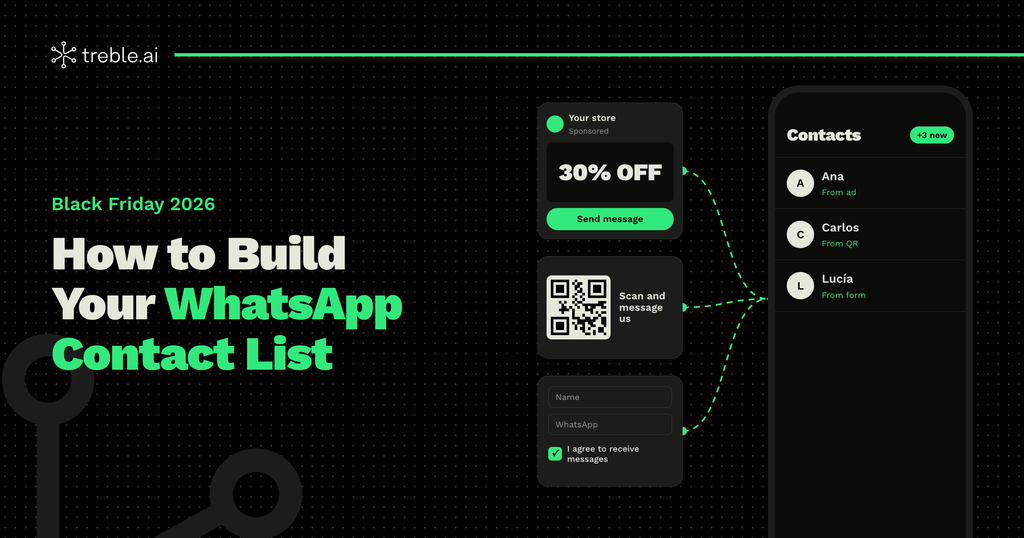
1. Click to WhatsApp ads
Instagram and Facebook ads that open a WhatsApp chat are one of the most effective ways to grow your list. The person messages you first, and in that same conversation you can ask for permission to send them your Black Friday deals. Plus, conversations that start from these ads may qualify for the free-of-charge conditions set by Meta.
2. QR codes in your store and on your packaging
If you have physical stores, a QR code on the counter, in the window, or on your product packaging turns in-store customers into WhatsApp contacts. Pair it with a message like “Scan to get our Black Friday deals first.”
3. Forms on your website and at checkout
Add a WhatsApp field to your sign-up, contact, or purchase forms, with an unchecked box that says something like: “Yes, I want to receive deals from [your brand] on WhatsApp.”
4. An early-access incentive
On Black Friday, the best reason to share a phone number is getting the deals before anyone else. Create an “early access” or “VIP list” campaign on your website and social media.
5. Invitations from your other channels
Your social media followers and email subscribers already know your brand. Invite them to join you on WhatsApp with a direct link in your bio, your emails, and your team’s signature. Keep in mind: having someone’s email or phone number isn’t the same as having their permission to message them on WhatsApp. It’s the invitation that creates the opt-in.
6. Your customer service conversations
Everyone who messages you with a question is a potential contact. At the end of the conversation, ask them if they’d like to receive your deals and news on WhatsApp. It’s the perfect moment, because a relationship already exists.
What You Should Never Do
Some shortcuts look fast but end up costing you:
- Buying or renting contact lists.
- Using pre-checked permission boxes.
- Messaging someone who gave you their number for something else, like an invoice or a delivery.
- Hiding the permission in fine print or in the terms and conditions.
All of these practices increase blocks and reports, and can lead Meta to pause your templates or restrict your number in the middle of your campaign.
How to Organize Your List for Black Friday
Getting contacts is half the job. The other half is organizing them so you send the right message to each person. Save at least three pieces of information for every contact:
- Where they came from: an ad, your store, your website, or customer service.
- What they’re interested in: the product categories or services they asked about.
- Their history: whether they’ve bought before, when, and how much.
With that information, you can segment your campaigns: early access for your best customers, a welcome offer for new contacts, and reminders for people who left an abandoned cart. If you connect WhatsApp to your CRM, such as HubSpot or Zoho, all of this updates automatically.
Start Today, Sell in November
Your opt-in contact list is the starting point of your entire Black Friday on WhatsApp. The sooner you start, the bigger and more valuable it will be when the big day arrives.
At Treble, we help you connect your ads, your website, and your CRM with WhatsApp, so every new contact joins your list with their permission and their context. If you want to get your Black Friday ready ahead of time, talk to our team.